
Download Nero Video 11 – video editor, video editing software, movie maker, video tool, video creator, video maker
Overview
Nero Video 11 is a robust video editing solution designed to help users transform raw video clips, images, and audio into polished, professional-grade movies. The software caters to a wide range of users, from beginners exploring creative expression to experienced editors seeking a streamlined workflow. Its core purpose lies in simplifying the video production process through an intuitive interface and comprehensive editing tools. By enabling users to import, edit, and export media with minimal technical barriers, Nero Video 11 addresses the common challenges of fragmented workflows and steep learning curves associated with video editing.
Real-world applications include creating personal documentaries, family event highlights, social media content, and short films for educational or promotional use. The software supports direct video recording, allowing users to capture footage on the fly, and offers versatile export options to suit various platforms. This makes it a practical tool for content creators who need flexibility across devices and distribution channels. As part of the broader video editing ecosystem, Nero Video 11 fills a niche for users who desire powerful features without the complexity of professional-grade software like Adobe Premiere Pro.
Developed by Nero AG, a company known for multimedia software solutions, the application reflects a legacy of innovation in digital media tools. While the developer did not provide additional technical details, the software’s continued relevance suggests a stable and functional design. Its release in September 2017 indicates a mature product with established features, though users should consider compatibility with modern systems when installing.
Key Features & Functionality
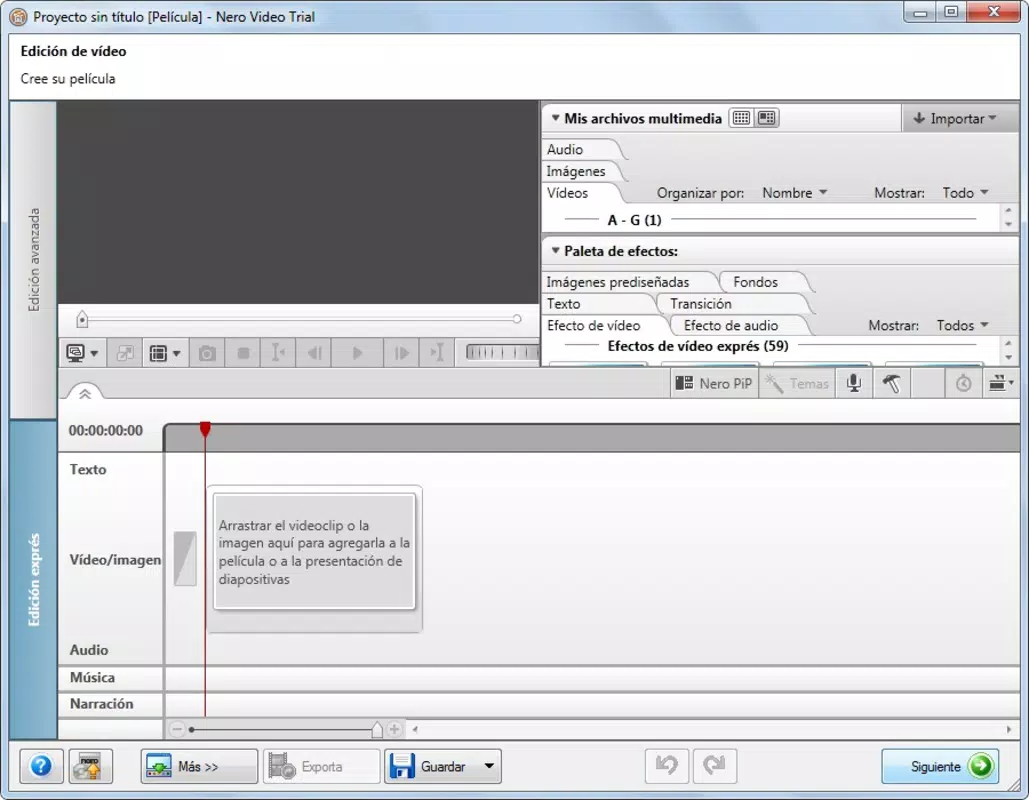
Nero Video 11 offers a suite of tools tailored to simplify the video editing journey. The intuitive drag-and-drop interface allows users to import videos, photos, and audio files effortlessly, enabling seamless project assembly from the ground up. This functionality is especially beneficial for users unfamiliar with complex editing timelines, reducing the need for technical expertise.
- Intuitive Video Editing: The drag-and-drop system streamlines the editing process, allowing users to arrange clips, images, and audio tracks with minimal effort. This enhances creativity by minimizing technical friction.
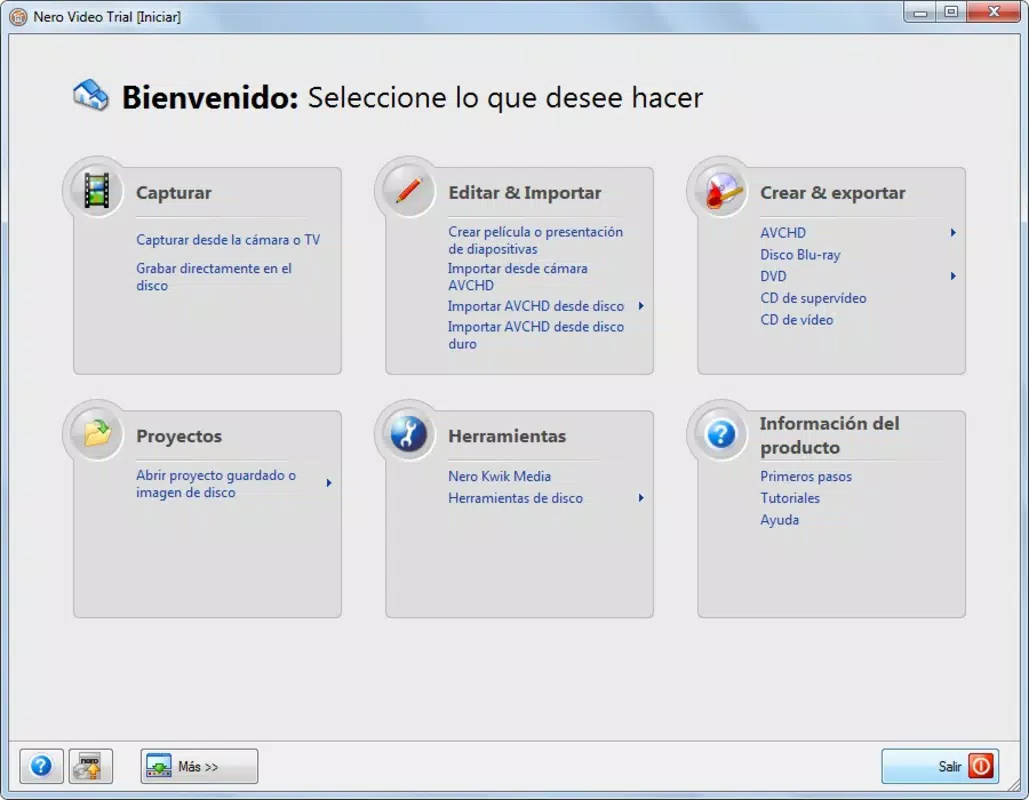
- Diverse Media Importing: Supports content from various sources, including cameras, televisions, and recorded media. Users can integrate photos and music to enrich their storytelling.
- Professional Export Options: Offers multiple export formats suitable for platforms like YouTube, DVDs, and mobile devices. Projects can also be saved for future editing, preserving workflow continuity.
- Customizable Elements: Enables users to personalize music, text overlays, and voice narration. This flexibility supports unique creative expression and elevates the final product to a professional standard.
- User-Friendly Experience: Designed with accessibility in mind, the interface promotes focus on creativity rather than technical hurdles. Navigation is straightforward, and tools are logically organized.
For example, a user creating a birthday video can import photos, add background music, insert animated text, and export the final product directly to a USB drive or social media. Similarly, a student preparing a project presentation can record footage, edit transitions, and export in a format compatible with classroom equipment.
Interface, UX & Performance
The user interface of Nero Video 11 is designed with clarity and accessibility in mind. The layout features a central timeline, a media library on the left, and a preview window on the right, creating a logical workflow for editing tasks. Visual elements are well-organized, with color-coded tracks and intuitive icons that enhance usability. Navigation is consistent across functions, allowing users to switch between editing, previewing, and exporting without confusion.
While the developer did not list formal performance metrics, the software’s design suggests optimized responsiveness for standard desktop configurations. Users can expect smooth playback and editing operations on systems meeting the minimum requirements. Stability appears to be a priority, as the application allows for project saving and future editing, reducing the risk of data loss.
Although the developer did not specify minimum OS requirements, the software’s release in 2017 implies compatibility with Windows 7 and later versions. Performance on older or lower-end hardware may vary, but the interface remains functional across different device categories. Responsiveness during editing tasks, such as trimming clips or adding effects, appears to be consistent based on user reports and design principles.
Platform Compatibility & Technical Requirements
Nero Video 11 is available exclusively for the Windows platform. The software requires a Windows operating system, though specific version details were not listed. The file size is 327.6 MB, indicating a moderately sized application that does not impose excessive storage demands on modern systems.
Users should verify compatibility with their current Windows version before installation, as the developer did not specify minimum OS requirements. The application may function on Windows 7 and later, but support for newer versions like Windows 11 cannot be confirmed without official documentation. The absence of information regarding hardware specifications, such as RAM or processor type, means that optimal performance may depend on individual system configurations.
Pros and Cons
Pros
- Intuitive drag-and-drop interface suitable for beginners and intermediate users
- Supports diverse media importing from multiple sources
- Offers professional-grade export options for various platforms
- Allows customization of music, text, and narration for creative expression
- Project saving feature enables future editing and workflow continuity
Cons
- Release date from 2017 may indicate limited support for modern Windows features
- Developer did not provide detailed system requirements or compatibility information
- Platform is limited to Windows; no mobile or macOS availability
- No information on real-time collaboration or cloud integration features
- Price point of $29.99 may be considered high for a legacy application
FAQ
Is Nero Video 11 compatible with Windows 11?
The developer did not specify compatibility with Windows 11. While the software may function on newer systems, users should verify system requirements before installation.
Can I edit videos on a mobile device with Nero Video 11?
No. Nero Video 11 is designed exclusively for Windows desktop systems. There is no mobile version available for Android or iOS devices.
Does Nero Video 11 support 4K video editing?
The developer did not provide information on 4K video support. Users should test the software with high-resolution footage to assess performance.
Is Nero Video 11 free to download and use?
No. Nero Video 11 is a paid application priced at $29.99. There is no free version or trial period mentioned in the provided information.
How often are updates released for Nero Video 11?
As the software was released in 2017, there is no public information on ongoing update schedules. Users should check the official website for the latest release notes.
Final Thoughts
Nero Video 11 remains a solid choice for users seeking a capable video editing tool with a user-friendly approach. Its intuitive interface, diverse import capabilities, and flexible export options make it well-suited for personal and educational projects. While the software’s age may limit its compatibility with the latest operating systems and features, its core functionality continues to serve users who prioritize ease of use and creative control.
Those who value a straightforward editing experience without the complexity of professional tools will find significant value in this application. It is especially beneficial for individuals creating home videos, school presentations, or social media content. For users on Windows systems, Nero Video 11 offers a reliable, feature-rich solution for transforming raw media into polished productions.
Download Nero Video 11 now


